


Ransomware can make documents, photos, project files, and even your entire system inaccessible in just a matter of moments. Ransom notes often claim that paying is the only way you can get your data back, but this isn’t always the case. Depending on the attack, you may have other recovery options available to you.
The ransomware threat is also becoming increasingly lucrative to threat actors. As we covered in our recent look at why ransomware attacks are on the rise, ransomware groups generated an estimated $529.2 million in the first quarter of 2026 — a 39% year-on-year increase.
Safe recovery may involve clean backups, unaffected copies, previous file versions, trusted public decryptors, or professional data recovery. Your priority should be to contain the attack and preserve your recoverable data before you pay the ransom, wipe your systems, or reconnect your backups.
Can You Recover Ransomware-Encrypted Files Without Paying?
The simple answer? Sometimes, yes. However, your recovery options depend on the type of ransomware involved, what it changed on your computer, and whether usable copies of your data still exist.
Possible recovery routes include:
- Restoring from a verified clean backup
- Recovering unaffected copies of important files
- Restoring older file versions or snapshots that survived the attack
- Recovering deleted or residual data where technically possible
- Using a reputable public decryptor, if one exists for that ransomware family
- Professionally recovering data from partially affected storage
Modern ransomware is often specifically designed to make direct decryption extremely difficult, though. As such, no legitimate recovery provider can reasonably promise that every ransomware-encrypted file can simply be decrypted.
For that reason, avoid deleting, renaming, modifying, or repeatedly opening encrypted files while you assess your options. Preserving the original affected data gives you the best chance of using backups, decryptors, file reconstruction, or professional recovery methods later without inadvertently destroying information that could still be useful.
What Does Ransomware Do to Your Data?
Ransomware is designed to make your data inaccessible. It usually does so by encrypting your files so the applications that normally open them are no longer able to read them. Affected files may also be renamed or given unfamiliar extensions, making it obvious that something has changed.
The attack doesn’t necessarily stop with the files stored on just one computer. Depending on how far the ransomware spreads, it can also target:
- Local hard drives and SSDs
- Shared folders
- Network storage
- NAS devices
- Servers
- Connected backup systems
Some ransomware also tries to delete or damage recovery information, snapshots, and backups to make restoring your files more difficult. In more advanced attacks, the criminals may spend time inside a network before triggering the encryption stage, giving them an opportunity to identify valuable systems and data first.
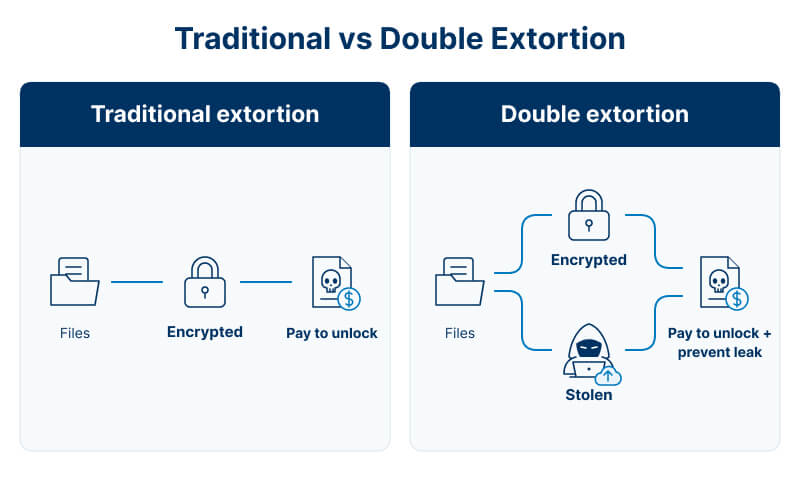
Modern ransomware attacks can also involve data theft in addition to encryption. Attackers copy your sensitive information before locking the original files, then threaten to publish or sell that stolen data unless you pay the ransom. This is known as double extortion: the victim faces both a decryption demand and a threat to expose stolen information.
What to Do Immediately After a Ransomware Attack
Once you discover a ransomware attack, prioritise containing the incident and preserving as much recoverable data as possible. Avoid making any rushed changes that could spread the malware or destroy useful evidence.
1. Isolate Affected Devices
The first thing you want to do is disconnect your affected computers and devices from the network as quickly as you can:
- Turn off Wi-Fi.
- Unplug Ethernet cables.
- Disconnect shared drives and network storage where it is safe to do so.
- If you are dealing with a business network, notify your IT or security team immediately.
The goal is to stop the ransomware from spreading further and reaching additional systems, shared folders, or network-connected backups.
2. Do Not Wipe or Reformat Anything
Even if you have a usable backup, avoid reformatting until you’ve confirmed the affected system no longer needs to be preserved for recovery or investigation.
Reinstalling your operating system, formatting the drive, deleting encrypted files, or running aggressive cleanup tools are examples of mistakes to avoid after a data loss event — they can remove potentially recoverable data, while destroying useful evidence about how the attack happened.
3. Keep Backups Disconnected
This point is particularly important: do not connect any external backup drives to your affected computer.
- Keep your offline backups offline.
- Do not restore data onto systems that may still be compromised.
- Protect backup administrator accounts and credentials.
If ransomware can still access the network, reconnecting backups too early could put your otherwise clean copies at risk as well.
4. Preserve Evidence of the Attack
Keep a record of:
- The ransom note
- Any new file extensions
- Screenshots and error messages
- The approximate time the attack was discovered
- A list of affected devices and systems
- Any attacker contact details or payment instructions
This information can help identify the ransomware family and determine which recovery options may still be available.
5. Verify Your Backups
Make sure that your backups still work — but only do this from an environment you know is unaffected. Confirm that they predate the compromise, open correctly, and haven’t been encrypted or tampered with.
6. Assess How Far the Attack Spread
Check your workstations, servers, RAID systems, NAS devices, shared folders, cloud storage, and backup infrastructure.
For organisations, this is also the point where you should get a qualified cybersecurity or incident-response specialist involved if the attack extends beyond a single device.
Why Paying the Ransom Isn’t a Safe Recovery Strategy
Paying a ransom may seem like the fastest and simplest way to regain access to your encrypted files. However, doing so won’t guarantee a successful recovery.
First, the attacker won’t necessarily keep their word and provide you with a working decryption key. And worse, they may also demand more money later. Even when they provide a decryptor, it may be slow, unreliable, or unable to repair every damaged file.
There are other risks, too. Your systems may still contain malware or remain accessible to attackers, and stolen information may still be leaked or sold even after you pay the ransom.
This is particularly important in a double extortion attack:
- Traditional ransomware: “Pay or lose access to your files.”
- Double extortion: “Pay to recover your files — and pay to stop us releasing the copy we already stole.”
The UK National Cyber Security Centre (NCSC) and UK law enforcement do not encourage, endorse, or condone ransom payments. The NCSC also warns that payment does not guarantee access to your data, that systems may remain compromised, and that stolen data may still not be deleted.
Even after payment, you may still need clean backups, data recovery, malware removal, and a full investigation to safely restore your systems and files.
How a Professional Data Recovery Service Can Help
Professional ransomware recovery isn’t just a matter of “decrypting” your locked files. A recovery provider can assess the affected storage, preserve the original drive as carefully as possible, and determine which recovery routes are still realistic for your situation.
Depending on the case, this can involve:
- Restoring data from verified clean backups
- Recovering unaffected copies of files
- Searching storage for deleted or residual data
- Working with partially damaged file systems
- Reconstructing usable files or datasets where enough original information remains
- Recovering data from ransomware-affected HDDs, SSDs, RAID arrays, servers, NAS devices, and external storage
For more complex systems, specialist RAID data recovery might be needed if ransomware has affected multiple drives or a storage array.
Any recovered files should then be returned to clean storage, not placed back onto a system that could still be compromised. This helps avoid reintroducing the data to an infected environment.
At Secure Data Recovery, we can help with the storage and file-recovery side of a ransomware incident, including complex server and encrypted-storage cases.
It’s important to note that professional data recovery does not replace a full cybersecurity or incident-response investigation, particularly when attackers have compromised a wider network. In those situations, both recovery and security specialists may need to work alongside one another.
How to Prevent the Next Ransomware Attack
Recovering from ransomware is only part of the job. Once your data is safe, the next priority is minimising the chance that another attack can reach the same files again — and if they do, to ensure your data is safeguarded.
Keep Multiple Backups
A 3-2-1-style backup strategy gives you more than one recovery path if ransomware affects your primary system.
Aim for:
- At least 3 copies of important data
- Stored across 2 different types of storage or locations
- With at least 1 copy kept offsite or otherwise isolated
The goal is to avoid ever being dependent on a single backup that could fail or be encrypted at the same time as your main data.
Keep One Backup Outside Ransomware's Reach
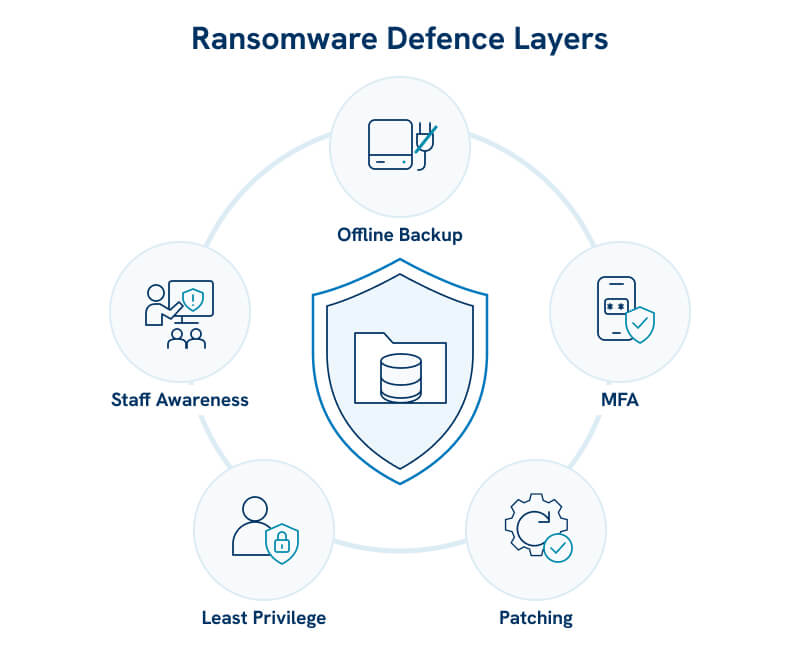
A backup that is permanently connected to the same network is just as vulnerable as your computer, and can still be reached and targeted by ransomware. Keep at least one copy protected through:
- Offline external storage
- Segregated backup infrastructure
- Immutable backups
- Versioned cloud backups
- Separate administrator credentials for backup systems
By doing this, you limit the attacker's ability to destroy all your recovery options at once.
Test Your Backups
It’s not enough to just assume that a successful backup job means that your data can actually be restored. Regularly check that:
- Your critical files are included
- Backups complete successfully
- Your files can be restored and opened
- Older clean versions remain available
A backup that cannot be restored isn’t a working backup, and certainly isn’t a reliable recovery plan.
Reduce the Risk of Reinfection
Backups should be something you use alongside broader cybersecurity controls. Make sure to keep your operating systems and applications patched, enable multi-factor authentication, restrict administrator privileges, use endpoint protection, and segment your critical systems where practical.
For organisations, staff training is also important. Teach employees to recognise phishing emails, suspicious links, and malicious attachments, while monitoring unusual logins or changes in privileges.
Backups and cybersecurity controls need to work together. One helps you recover when something goes wrong; the other helps stop attackers reaching your data in the first place.
Recover Your Data After a Ransomware Attack
If ransomware has encrypted important files and you don’t have a reliable clean backup, avoid making changes that could reduce your recovery options.
This means you should avoid:
- Wiping or reformatting affected storage
- Deleting encrypted originals
- Reconnecting backup media to compromised systems
- Restoring files into an environment that may still be infected
- Assuming paying the ransom is your only remaining option
At Secure Data Recovery, we can assess ransomware-affected hard drives, SSDs, RAID arrays, servers, NAS systems, and other storage to determine what recovery options may still be available to you.
Every ransomware case is different, and successful recovery depends on what exactly the malware changed, whether your backups were affected, and whether usable copies of the original data still remain.
If ransomware has put your irreplaceable data at risk, give us a call at 0800-102-6925 or start a case online today to discuss your safest recovery options.


